
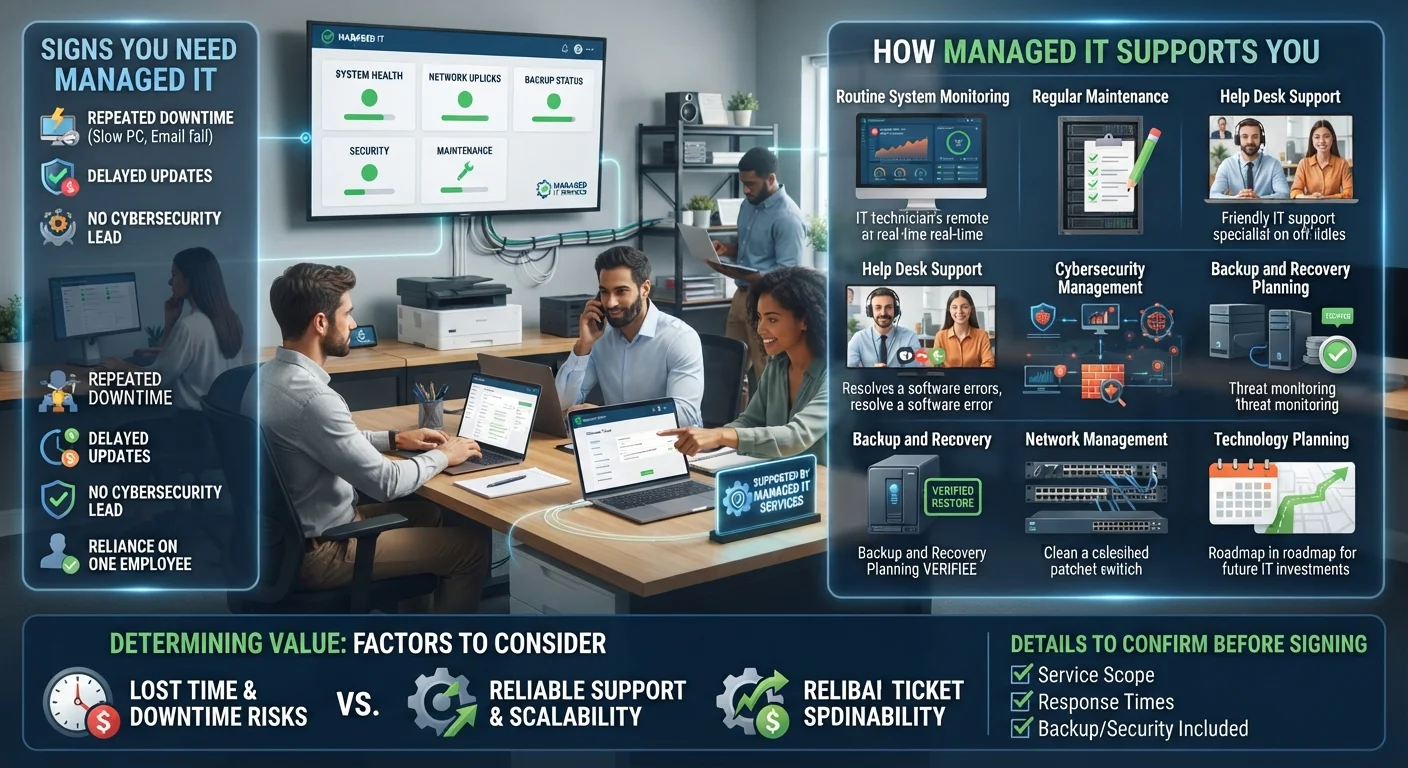
A small office may have only a few employees, but it still depends on email, shared files, computers, printers, networks, backups, and cloud applications. When one system fails, daily work can slow down quickly.
Managed IT services provide ongoing support instead of waiting for a serious problem. Their value depends on business needs, internal skills, downtime risks, and the services included.
Which Signs Suggest a Small Office Needs Managed IT Support?
Technical problems become expensive when employees repeatedly stop working to solve them.
- Employees regularly lose time because of computer problems
- Software updates are delayed or handled inconsistently
- No one is clearly responsible for cybersecurity
- Backups are created but rarely tested
- Email, internet, or shared files fail repeatedly
- Former employees retain access to business accounts
- Technology purchases are made without a clear plan
- The office relies on one employee for every technical issue
How Can Managed IT Services Support a Small Office?
A managed provider can handle recurring technical responsibilities while giving employees a clear place to request help. The exact scope depends on the service agreement.
Routine System Monitoring
Monitoring can identify storage problems, failed services, unusual activity, or device issues. Early visibility supports faster action before a minor fault becomes disruptive. Alerts still need sensible review.
Regular Maintenance
Computers, network equipment, and business applications require updates and routine checks. Planned maintenance reduces preventable problems caused by neglected systems. Maintenance windows should suit the office schedule.
Help Desk Support
Employees need somewhere to report slow computers, login failures, software errors, or printer problems. A defined support channel reduces confusion about who should respond.
Cybersecurity Management
Small offices still face phishing, malware, stolen passwords, and unsafe devices. Managed security brings several controls together instead of treating each threat separately.
Services may include firewall management, endpoint protection, threat monitoring, email security, and security assessments, depending on the selected plan.
Backup and Recovery Planning
Backups protect important information only when they run correctly and can be restored. Recovery testing confirms whether saved data is usable after deletion or failure.
Network Management
A stable network supports computers, phones, printers, cameras, and cloud tools. Proper configuration improves reliability while separating business systems where appropriate.
Technology Planning
A small office may replace equipment only after it stops working. Managed IT services for business can introduce a more organised approach to upgrades, security, recovery, and support. Forward planning spreads decisions over time.
Which Factors Determine Whether the Service Is Worth the Cost?
Price alone does not show value. The decision should compare the agreement with current support costs, lost employee time, operational risk, and expected business growth.
-
Number of Employees and Devices
More users usually create more support requests, accounts, permissions, and endpoints. The technology footprint matters more than office size when estimating support needs.
A five-person office with specialised systems may require more support than a larger team using a simple and well-maintained setup.
-
Dependence on Technology
Some offices can continue working briefly without email or shared files. Others may lose customer communication, scheduling, invoicing, or order processing immediately. Higher dependence increases the value of prevention.
-
Existing Internal Skills
An employee may handle basic troubleshooting but lack time for security, backups, and long-term planning.
Informal support can leave important duties uncovered. Management should also consider what happens during leave, illness, or staff turnover.
-
Current Problem Frequency
Recurring failures may indicate outdated devices, weak network design, poor maintenance, or unresolved configuration problems.
Repeated incidents create hidden labour costs. Track how often problems occur and how long they affect employees.
-
Service Scope
Some agreements cover monitoring and remote support, while others include onsite help, backups, security, or planning. The included work determines practical value. Read exclusions carefully.
-
Response and Escalation Terms
A provider should define how requests are classified and handled. Urgent incidents need a different response from routine questions or minor software issues.
Ask who receives escalated cases, when onsite support is available, and how the provider communicates during a prolonged disruption.
-
Business Growth Plans
Hiring employees, opening another location, or adopting new software changes technology requirements.
Scalable support can make growth easier when accounts and equipment must be added. A provider should understand the business direction.
Details to Confirm Before Signing
A clear agreement prevents confusion after support begins. Compare providers using the same practical criteria and request written details where possible.
- Covered users, devices, locations, and systems
- Included monitoring and maintenance services
- Priority levels for routine and urgent requests
- Availability of remote and onsite support
- Backup coverage, testing, and monitoring
- Cybersecurity controls included in the plan
- Work that may create additional charges
- Terms for changing or ending the agreement
Conclusion
Managed IT services can be worthwhile when a small office needs reliable support, stronger security, planned maintenance, and faster recovery. The value depends on service scope, response terms, internal skills, and business risk. Compare the agreement with the real cost of downtime before deciding.
Share this Post
latest post
-
 Are Managed IT Services Worth It for a Small Office? November 23, 2026
-

-

-
 Internet cafes Ohio November 15, 2025
-
 Internet Cafe, Key West November 5, 2025
-
 Internet Cafe Anchorage October 26, 2025
-
 Internet Cafe Queens NY October 16, 2025
-
 Internet Cafe Victoria Station October 6, 2025
-
 The Evolution and Enduring Niche of Internet Cafés October 3, 2025